


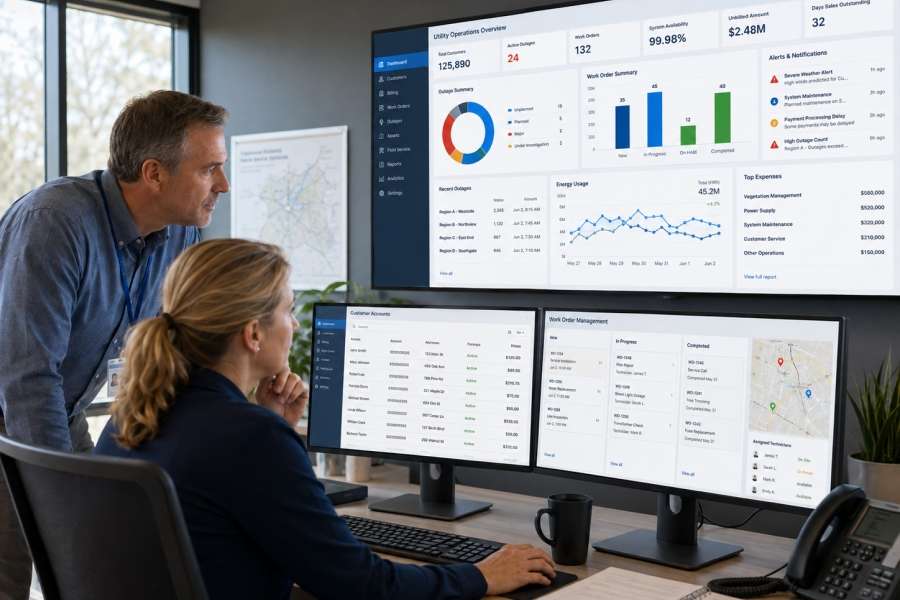
When utility managers tackle next year’s budget, the numbers they need are too often not in one place. Customer billing data sits in one system, work order history in another, and the general ledger in a third. Reconciling those systems manually is a familiar routine for many utilities, and it’s exactly the problem an integrated enterprise resource planning (ERP) platform is built to solve. CentralView¹, from Central Service Association (CSA), is one such platform, purpose built for the operational realities of municipal utilities and electric cooperatives alike.
Whether you manage a city-owned electric and water system or a member-owned electric cooperative, the system(s) you choose have a real impact. It determines how customers are billed, how field crews are dispatched, how leadership reports to a governing board or city council, and how accurately your organization can forecast the financial future. This guide walks through what a modern utility ERP platform should include, the criteria that matter most when evaluating one, and the considerations that are distinct to municipal utilities versus electric cooperatives.
Why Utility ERP Software Is Different From General Business ERP
General-purpose ERP software, built for manufacturing, service or retail businesses, is not designed around the way utilities operate. Utilities bill based on a regulated or member-approved rate structure, not a market price. They manage essential services, not just customer accounts. They report to a city council, or board, and are accountable to their customers rather than shareholders, and their capital planning cycles are tied to infrastructure that lasts decades, not one or two-year product cycles.
A utility-specific ERP platform accounts for those differences from the ground up. Rate structures, service territory management, regulatory and board reporting, and capital asset tracking are treated as core functions rather than add-ons to a generic accounting system.
Signs Your Current Systems Are Holding You Back
Before evaluating new platforms, it helps to identify what isn’t working today. Common signals include:
- Billing staff manually re-keying data between a legacy CIS and financial system.
- One department must wait days for data from another department to compile a board or council report.
- Customer service representatives are unable to see a customer’s full account history on one screen.
- IT staff spend more time maintaining integrations between systems than supporting staff who use them.
All these problems are the predictable result of stitching together multiple solutions over many years.
What a Modern Utility ERP Platform Should Include
At its core, the architecture of a utility ERP platform enables your organization to both run day-to-day operations and do long-term planning. While features vary by vendor, most utility-grade platforms fill the following functional areas.
Customer Information and Billing
A customer information system (CIS) capability to manage customer accounts, service history, rates, and billing cycles. For multi-service utilities, that means the platform needs to bill electric, water, gas, and other services from a single customer record rather than juggling separate systems for each.
Financial Management
General ledger, accounts payable, accounts receivable, budgeting, and financial reporting all based on the same data. For municipal utilities in particular, this financial data needs to be structured in a way that supports public reporting and audit requirements.
Work and Asset Management
Work order management, asset tracking, and maintenance scheduling functions help operations teams plan and document field work, from routine maintenance to capital projects.
Reporting and Analytics
Dashboards and reporting tools that pull from the same underlying data set, rather than requiring staff to export and reconcile data from separate systems, save meaningful staff time and reduce the risk of reporting errors.
It’s worth noting that meter data management (MDM), the software that collects, validates, and analyzes smart meter data, is a standalone product rather than a built-in component of the ERP platform itself. A well-designed ERP platform should integrate cleanly with your MDM system, along with your outage management system (OMS) and geographic information system (GIS), so that validated usage and operational data flow between systems without manual re-entry.
Key Criteria for Evaluating a Utility ERP Platform
With these functional building areas in mind, here are the things that distinguish a platform that fits your organization from one that creates new problems.
Integration Depth, Not Just Integration Claims
Nearly every vendor will say their platform “integrates” with other systems. The more useful question is how deep that integration is. Does validated meter data flow automatically into billing through a real-time connection, or does it require a manual export and import step or an overnight batch file? Does a work order created in the field update the asset record immediately? Ask vendors to walk through the actual data flow between systems, including whether the connection runs through modern application programming interfaces (APIs) or older file-transfer methods, rather than relying on a list of systems the platform claims to connect to.
True Multi-Service Capability
If your utility bills for more than one service, whether that’s electric, water and gas, or electric and broadband, the platform needs to handle them all natively. That means collections logic that accounts for a customer’s balance across services.
Configurability Around Your Rate Structure and Workflows
Utility rate structures, reporting requirements, and internal workflows vary widely. A platform that can be configured to match how your organization operates, rather than forcing your organization to adapt to the software, reduces both the pain of implementation and the risk of workarounds that undermine data quality later.
A Vendor That Understands Utilities Like Yours
A platform built for a large investor-owned utility with a dedicated IT department is not usually the right fit for a municipal utility or a cooperative with smaller staff. Ask prospective vendors how many utilities of your size and structure they currently support.
Implementation and Ongoing Support
Software selection doesn’t end with the purchase decision. Ask about implementation timelines, training resources, and what ongoing support looks like once the system is live. A vendor with a track record of supporting utilities like yours means a lot.
Total Cost of Ownership
The purchase price or subscription fee is only part of the cost picture. Ask about implementation fees, data migration costs, the cost of add-on modules you may need later, and what ongoing support and upgrades cost after the first year. A platform with a lower initial price may end up costing more in the long run.
Data Security and Payment Continuity
Utility billing systems handle sensitive customer and financial data and increasingly process payments through Automated Clearing House (ACH) transfers and interactive voice response (IVR) phone payment systems. Ask how the platform secures that data, how it handles payment card and banking information, and what the vendor’s uptime track record looks like.
If You’re Using an RFP: What to Ask For
Many utilities, particularly municipal utilities subject to public procurement requirements, formalize their evaluation through a request for proposal (RFP) process. If yours does, a well-built RFP goes beyond a generic feature checklist copied from a template. Include specific scenarios drawn from your own operations, such as how the platform would handle your actual rate structure, your multi-service billing needs if applicable, and your board or council reporting requirements. Ask vendors to demonstrate, not just describe, how data moves between modules, and request references from utilities of a similar size, service mix, and governance structure to your own. Ask those references directly about implementation timeline, support responsiveness, and anything else they may wish to share.
Considerations Specific to Municipal Utilities
Municipal utilities operate inside a public governance structure that dictates what the software needs to do. Annual or multi-year rate cases typically require presentation to a utilities board and approval by city council, which means budgeting and financial reporting tools need to produce information suitable for public review, not just internal management.
Public records requirements are another factor. Data retention, audit trails, and reporting formats may need to satisfy state open-records laws in addition to internal policy. A platform that makes it straightforward to generate clean, presentation-ready financial and operational reports for a council meeting saves significant staff time during budget season.
Considerations Specific to Electric Cooperatives
Electric cooperatives operate under a member-ownership model with a member-elected board, which has its own reporting expectations. Board packets and member communication tools matter in a cooperative context in ways that may not apply to an investor-owned or municipal utility.
Cooperatives, particularly in rural service territories, often run lean operations and IT teams. A platform that requires a large, dedicated IT staff to maintain is a poor fit regardless of how capable it may be. Ease of administration and the availability of vendor support matter as much as functionality for organizations operating with limited internal technical resources.
What This Looks Like in Practice
Consider two scenarios. In the first, a utility’s billing team gets an alert from the metering system’s validation, estimation, and editing (VEE) process, flagging a possible meter communication issue before it reaches a customer’s bill. On a poorly integrated system, that flag might sit unnoticed until a customer calls about an unusually high bill. In a well-integrated platform, the flag routes automatically to the right team, the billing run holds for that account until it’s reviewed, and the resolution is logged against the customer’s history.
In the second scenario, a finance director preparing a rate case needs a report showing year-over-year cost trends by service type, broken out for a city council presentation. On a fragmented system, this means pulling data from billing, work management, and the general ledger separately, then reconciling it by hand, often a multi-day task during an already busy budget season. On an integrated platform, the same report can be generated directly from a single data source in a fraction of the time, with the confidence that every number ties back to the same underlying records
Frequently Asked Questions
How long does a typical utility ERP implementation take?
Timelines vary by utility size and the number of modules involved and vendor, but most implementations run several months from the time installation begins. During installation best practice dictates running the new system in parallel with the legacy system to ensure continuity during the transition.
Can a municipal utility and electric cooperative use the same ERP platform?
Yes. The core functional needs, billing, financials, work management, and reporting, overlap significantly. But it’s important to make sure reports that are needed on a recurring basis are easily available.
Does adopting a new ERP platform mean replacing your MDM or OMS system too?
Not necessarily. Because MDM and OMS are typically standalone systems that integrate with your ERP platform, many utilities keep an existing MDM or OMS investment in place and simply confirm, through an RFP or direct vendor conversations, that the new ERP platform integrates cleanly with them.
Common Pitfalls When Evaluating ERP Platforms
- Evaluating based on a feature checklist alone, without fully understanding how a particular system operates.
- Underestimating the change-management required to transition staff from the legacy system to the new system.
- Choosing a platform with an architecture that may not be the best fit for your utility.
- Overlooking long-term support, training and additional charges and hidden charges in favor of a lower up-front price.
- Failing to involve all departments that will use the system. If key stakeholders are excluded, you risk choosing a system that works well for one group but creates problems for others.
Planning Your Implementation Timeline
Utility ERP implementations typically take several months to a year or more from contract to go-live, depending on the number of modules being deployed and the complexity of data migration from legacy systems. Building in adequate time for data cleanup, staff training, and a phased rollout, rather than a single hard cutover, tends to produce a smoother transition and fewer disruptions to billing and customer service during the change.
A phased approach generally starts with the core financials, and then the CIS, running in parallel with the legacy system for at least one full billing cycle to confirm accuracy before final cutover. Work management and reporting modules typically follow once the core system is stable. Have a small internal team representing every department involved throughout the process to serve as the primary point of contact with the vendor’s implementation team and champion the new system with their departments once it’s live.
The Right Fit for Your Utility
There is no single “best” utility ERP platform. Identify the one that best fits your organization’s size, service mix, governance structure, and staff capacity. And make sure you understand the ongoing total cost of ownership.
Be sure your evaluation is based on your actual operational scenarios rather than a generic checklist. At the same time, keep an open mind. The new system may offer ways to improve on current workflows and procedures.
CSA’s CentralView¹ platform was built specifically to serve both municipal utilities and electric cooperatives, seamlessly connecting customer information, billing, finance, and operations within a single environment. To see how it fits your organization’s specific needs, request a demo with our team.
Related Reading
For a deeper look at why integrated platforms outperform standalone software during high-demand periods, see Utility ERP vs. Standalone Software: Why Integrated Platforms Win During Peak Demand.
The information presented in this article is intended for general educational purposes. Utility software environments vary significantly. We recommend consulting with a qualified technology advisor to evaluate solutions appropriate to your organization’s specific operational requirements.
¹ CentralView is Central Service Association (CSA) Trademark.